2019年12月11日星期三

SVCI 2020 FVDI AVDI ABRITES Commander Full Version IMMO Diagnostic Programming Tool with 21 Latest Software

The difference between SVCI 2020 and SVCI 2018
SVCI FVDI V2020 Hardware Difference:
1.SVCI 2020 has fewer button batteries than SVCI 2018.
2.SVCI 2020 does not need to be activated, it will not lock the machine, and the serial number will not be lost.

SVCI FVDI V2020 Software Difference:
SVCI 2020 has 19 more software than SVCI 2018:
1.ABRITES Commander for VAG V37.0,
2.ABRITES Commander for BMW V10.5,
3.ABRITES Commander for Mercedes V10.4
4.ABRITES Commander for Bikes V2.0
5.ABRITES Commander for Chrysler V3.4
6.ABRITES Commander for Daihatsu V1.4
7.ABRITES Commander for FIAT V7.6
8.ABRITES Commander for Ford V7.7
9.ABRITES Commander for Hyundai V4.4
10.ABRITES Commander for JLR V2.6
11.ABRITES Commander for Mitsubishi V3.7
12.ABRITES Commander for Nissan V5.7
13.ABRITES Commander for OPEL V7.5
14.ABRITES Commander for Porsche V7.1
15.ABRITES Commander for PSA V6.3
16.ABRITES Commander for Renault V7.4
17.ABRITES Commander for Suzuki V1.2
18.ABRITES Commander for Toyota V11.4
19.ABRITES Commander for Volvo V6.2

These 19 softwares are all the latest software.
They support basic functions such as fault diagnosis, clearing of fault codes, reading of data streams, and motion testing to new models of 2019.
Currently, special functions are not supported. Among them, Suzuki and Daihatsu contain special functions.
How to Install SVCI 2020 Software:
There is only one executable file on the CD-ROM.
Double-click “AbritesCommanderSetup.exe” to start the installation.
Do not plug the USB into the computer during the installation.
After the installation is complete, connect the USB to the computer.

How to use SVCI 2020 Quick Start Software
1.VCI 2020 Quick Launch Software has 42 shortcut icons. Left-click the icon to launch the corresponding software.
2.Compared to the quick launch of SVCI 2018, the activation dialog is not displayed after clicking the icon.
3.The last icon is the firmware upgrade program. Click it to start the firmware upgrade program.
4.You must be online to download the latest firmware program. After downloading, click Update to update the firmware program.
5.After clicking the icon, the dongle program icon will appear in the tray at the bottom right corner of the computer.
6.The dongle program cannot be exited while the software is running.
SVCI(FVDI) Hardware Comparison

FVDI 2014 FVDI 2015 SVCI 2018 SVCI 2020
support softwares AVDI 18 software AVDI 18 software AVDI 18 software+
VVDI2 software
AVDI 21 software+
VVDI2 software
Software version One version two version two version three version
Support the years of
Vehicle manufacture
before
2014MY
before
2015MY
before
2015MY
before
2019MY
connection network NO YES YES NO
Online activate NO YES YES NO
useful life forever 5 years 5 years forever
stability Strong general general Strong
needs repaired No may be may be No
SVCI(FVDI) Software Comparison

FVDI 2014 FVDI 2015 SVCI 2018 SVCI 2020
Jaguar/
Land Rover
x x x v2.6
Suzuki x x x v1.2
Daihatsu x x x v1.4
VVDI x x v1.2.2 v1.2.2
VW/Audi/
Skoda/Seat
v18.0 v18.0
v24.0
v18.0
v24.0
v18.0
v24.0
v37.0
BMW/Mini v10.4 v10.4 v10.4 v10.4
v10.5
Mercedes_Benz/
Smart/MAYBACH
v5.11 v5.11
v7.0
v5.11
v7.0
v5.11
v7.0
v10.8
Renault/Dacia v5.2 v5.2
v6.3
v5.2
v6.3
v5.2
v6.3
v7.4
Peugeot/Citroen v5.10 v5.10
v6.7
v5.10
v6.7
v5.10
v6.7
v8.0
Fiat/Lancia/
Alfa/FCA
v5.1 v5.1
v5.7
v5.1
v5.7
v5.1
v5.7
v7.6
Opel/Vauxhall v5.8 v5.8
v6.6
v5.8
v6.6
v5.8
v6.6
v7.5
Ford/Mazda v4.9 v4.9 v4.9 v4.9
v7.7
Chrysler/Doge
/Jeep
v3.3 v3.3 v3.3 v3.3
v3.4
Toyota/Lexus/
Scion
v9.0 v9.0 v9.0 v9.0
v11.7
Nissan/Infiniti v4.3 v4.3 v4.3 v4.3
v5.7
Hyundai/KIA v2.1 v2.1 v2.1 v2.1
v4.4
Volvo v4.3 v4.3 v4.3 v4.3
v6.2
Mitsubishi Motors v2.1 v2.1 v2.1 v2.1
v3.7
Porsche v4.1 v4.1 v4.1 v4.1
v7.1
DAF v1.0 v1.0 v1.0 v1.0
Bikes/
Snowmobiles/
Water scooters
v1.2 v1.2 v1.2 v1.2
v2.0
TagKeyTool v6.2 v6.2 v6.2 v6.2
SVCI(FVDI) Supports the Years of Vehicle Models

FVDI 2014 FVDI 2015 SVCI 2018 SVCI 2020
Jaguar/Land Rover x x x before
2016MY
Suzuki x x x before
2019MY
Daihatsu x x x before
2019MY
VW/Audi/Skoda/Seat before
2014MY
before
2015MY
before
2015MY
before
2019MY
BMW/Mini before
2014MY
before
2015MY
before
2015MY
before
2019MY
Mercedes_Benz/Smart/
MAYBACH
before
2014MY
before
2015MY
before
2015MY
before
2019MY
Renault/Dacia before
2014MY
before
2015MY
before
2015MY
before
2019MY
Peugeot/Citroen before
2014MY
before
2015MY
before
2015MY
before
2019MY
Fiat/Lancia/Alfa/FCA before
2014MY
before
2015MY
before
2015MY
before
2019MY
Opel/Vauxhall before
2014MY
before
2015MY
before
2015MY
before
2019MY
Ford/Mazda before
2014MY
before
2015MY
before
2015MY
before
2019MY
Chrysler/Doge/Jeep before
2014MY
before
2015MY
before
2015MY
before
2019MY
Toyota/Lexus/Scion before
2014MY
before
2015MY
before
2015MY
before
2019MY
Nissan/Infiniti before
2014MY
before
2015MY
before
2015MY
before
2019MY
Hyundai/KIA before
2014MY
before
2015MY
before
2015MY
before
2019MY
Volvo before
2014MY
before
2015MY
before
2015MY
before
2019MY
Mitsubishi Motors before
2014MY
before
2015MY
before
2015MY
before
2019MY
Porsche before
2012MY
before
2012MY
before
2012MY
before
2019MY
DAF before
2012MY
before
2012MY
before
2012MY
before
2019MY
Bikes/Snowmobiles/
Water scooters
before
2012MY
before
2012MY
before
2012MY
before
2019MY
TagKeyTool before
2015MY
before
2015MY
before
2015MY
before
2015MY
VVDI before
2015MY
before
2015MY
before
2015MY
before
2015MY

SVCI FVDI V2020 Package includes:
1pc x SVCI FVDI 2020 Full Version IMMO Diagnostic Programming Tool with 21 Latest Software

2019年6月11日星期二

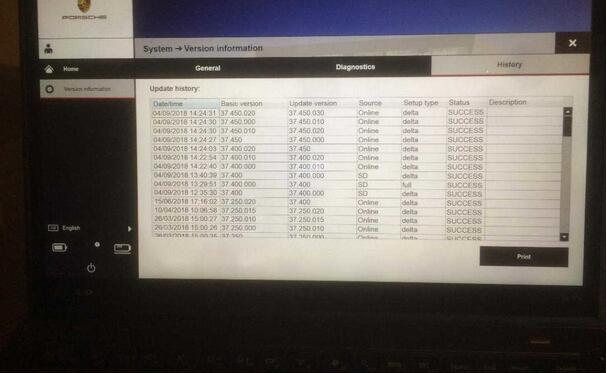
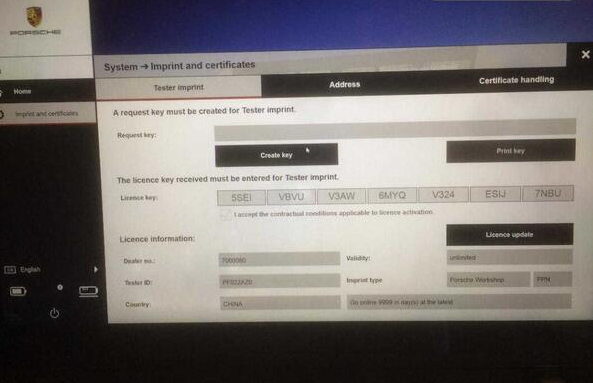
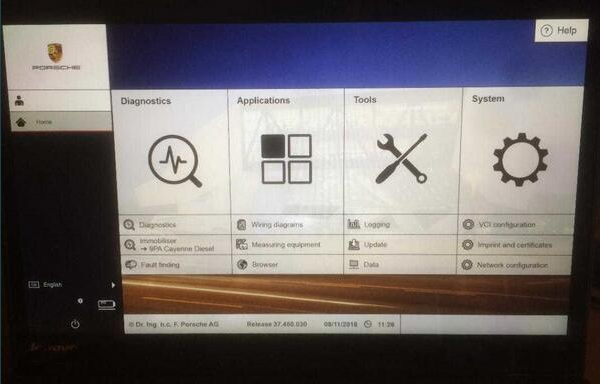
Possible to get Piwis 3 program work with Piwis interface tester 2

This answer for the question whether Piwis 3 diagnostic program can work with Piwis interface tester II
It may be an interesting subject, I’m sure there is some information about this out here.
The Piwis 2 interface is a lot more robust piece of equipment, compared to the cheesy and flimsy looking and feeling interface produced by Actia for Piwis 3.
Originally designed for the VW ODIS system,  the VAS 6154 VCI is quite the service needy piece. [Breaks easily] not a hard comparison to make.
Porsche went cheap on this VCI for Piwis 3. [my humble opinion, way below Porsche standard!]
There is a service from Poland and Ukraine [If I remember correctly] that can make the Samtec based Piwis 2 VCI,  to work with Piwis 3, unfortunately their charges are just as much and frankly cost prohibitive as the New Piwis 3 VCI.  2-3-4 thousand  dollars for these VCIs is simply not reasonable for small  operators. They will come down in price just like the Chinese VCIs did for all manufacturers as the markets get saturated and folks are not buying them as eagerly as in the beginning of the Piwis 3 phad.
They will get as much money as the market bares. [as much as people are willing to pay]
Your more pointed answers will not come in this tread Ibi.
This is CarsFan’s money making tread, he will not volunteer any information, but if U start your own tread, U may be more likely to find out stuff.
Regards, Albert.
p.s. links
Porsche piwis 2 china clone:
https://www.autonumen.com/goods-5017-+Porsche+Piwis+Tester+II+V151+with+CF30+Laptop.html
Vxdiag Prosche piwis 3:
https://www.autonumen.com/goods-6826-VXDIAG-VCX-DoIP-Porsche-Tester-Piwis-III-with-Lenovo-T440P-Laptop.html
4.1
4.2
4.3
4.5

2019年4月29日星期一

Autel MaxiSys MS906 vs MS906 TS vs MS 906 BT

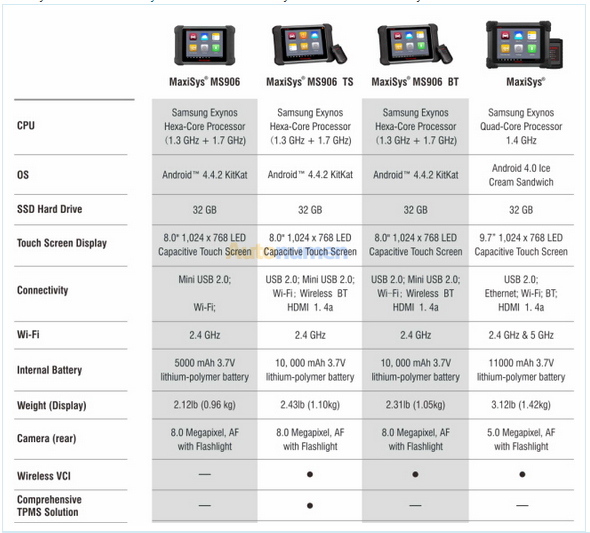
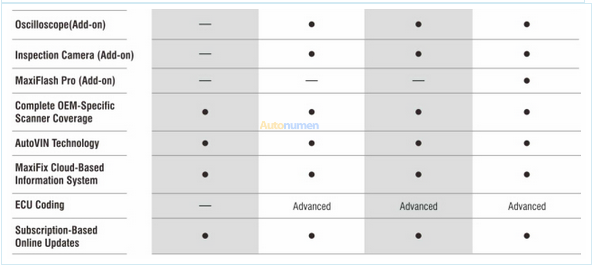
Here is the comparison table of Autel Tools Autel MaxiSys series diagnostic tabloets, including MaxiSysMS906, MaxiSys MS906TS, MaxiSys MS906BT and MaxiSys.
MaxiSys MS906 / MaxiSys MS906 TS / MaxiSys MS906 BT / MaxiSys
6.1
6.2

2018年11月30日星期五

The description of Autel MaxiSys pro MS908P

When using the world economy, there are many companies associated with instruments, they usually are comparative we know, but you will see even now tons associated with positive change, an individual identify, or perhaps will not realize, as you can imagine, this is undoubtedly inside look at as being a popular manager. Motor vehicle restore tools is not correctly exactly the same phone number adapters and chargers, every single brand name demands their very own vent, it’s nada substantially applied.
Autel MaxiSys Pro Scan Tool is surely an evolutionary smart resolution to get specific auto analysis and ECU encoding. Designed with your DNA associated with Autel’s diagnostics friends and family, your MaxiSys is built to provide a lot of the esteemed qualities on the MaxiDAS DS708 having serious easy utilize and powerful analysis operation. Autel MaxiSys expert MS908P is definitely unique via Autel, could redesign online, may be designed to often be your go-to tool for your qualified technical assistant exactly who functions J-2534 reprogramming frequently.
Your much likely AUTEL MaxiSYS Expert MS908P may be presented not too long ago. Autel MaxiSys expert MS908P is surely an evolutionary smart resolution to get specific auto analysis and ECU encoding. Designed with your DNA associated with Autel’s diagnostics friends and family, your MaxiSys is built to provide a lot of the esteemed qualities on the MaxiDAS DS708 Scanner having serious easy utilize and powerful analysis operation.
Your MaxiSYS? Expert may be designed to often be your autonumen for your qualified technical assistant exactly who functions J-2534 reprogramming frequently. MaxiSYS? Expert makes use of a ultra-powerful A9 quad-core, you. 40GHz processor chip that gives a 50% raise around rate vs competing merchandise, a being unfaithful. 7” CONTRIBUTED filter that has a you, 024 a 768 quality capacitive hint filter, a 32 GB Good Condition harddrive, the popular multitasking Bot Os and detailed OE-level motor vehicle protection. Your MaxiSYS? Expert comprises your J-2534 reprogramming field and specific MaxiSYS? Expert program needed for merchants and experts exactly who requirement a comprehensive analysis method capable of setting up sometimes the best complex and strenuous responsibilities. Your MaxiSYS? Expert contains most of important adaptors to get 1996 & more sophisticated automobiles, program to get Every day, Wok cookware, & Western automobiles (J-2534 vendor messages sold separately) and converter cables necessary to get the job done, and 12 months associated with FREE messages.

2018年11月21日星期三

FAQ Autel MaxiSys Elite Diagnostic Tool with J2534

Q:  What is the difference between Autel maxisys elite and maxisys pro?
A: MaxiSys elite comes with upgraded Hardware, Docking station, Better resolution screen, overall quicker unit..
The elite model offers more features than the pro version.
Q: It is original? Do you have warranty?
A:One year quality insurance. you can contact us at any time.
Q:  How about coding keys?
A:Yes, Autel Tools Maxisys elite can do key coding.This is the most advanced tool in automotive market.
Q: Does it come preregistred?
A: No, you should register it with your own ID and password. It only takes a few minutes, very easy to do it.
Q:HOW MANY FREE UPDATES COME WITH PURCHASE OF MAXISYS ELITE.
WHAT WILL HAPPEN IF I DO NOT UPDATE IT,OR IF I WANT TO UPDATE IT AFTER A YEAR OR TWO
A:It comes with one year free update. And you can still use it if you do not wanna to upgrade it.
Q:Which J2534 ECU Programmer the Pro or the Elite?
A: The J2534 programmer for the Pro and the Elite have no function difference. There are 2 versions of the MaxiFlash Pro. The original unit has an antenna and new unit (MaxiFlash Elite) is smaller without the antenna.

2018年10月25日星期四

Autel Maxisys MS908CV Description

The new Autel MaxiSys CV is crafted to the effective MaxiSys 908 platform and gives an extensive diagnostic solution for nearly all commercial vehicles as well as some popular styles of commercial machines from North The united states, Europe and Asia.
Providing sophisticated options and extraordinary ease-of-use, MS908CV is definitely the best remedy for impartial maintenance stores, owner-operators and several sized fleets trying to get just one scan resource for all their expert heavy duty needs..
Need to have help putting together your new machine? We offer on the web tech help, you are able to obtain us at whenever you will need support with the Autel Maxisys MS908CV. We will offer you possibly email, phone, or distant desktop support. .
Attributes
Components
MaxiFlash Elite VCI Module (J2534 Ecu Programming Product):
1. Terribly powerful Cortex-A9 quad-core processor
2. 9.seven Inch Multi Contact Capacitive Display with IPS technology. LED-backlit and Obtaining 1024×768 res show for max viewing advantage.
3. Consists of a sizable and quickly 32GB Stable Condition Drive to maximize tablet velocity overall performance, testing information storage, and knowledge business.
4. The VCI wirelessly connects into the key unit in just an entire two hundred meter range.
Application
1. Android OS with easy touchscreen interface, straightforward navigation, strong features, multitasking ease, and quick boot-up.
2.Finish capabilities for codes, stay facts, actuation exams, diversifications and European coding.
3.Displays dwell knowledge in textual content, graph, analog and electronic gauge for straightforward details evaluate and examination.
four.One-touch configuration of data, which include graphs, overall performance triggers, recordings, and playback of results.
five.Data and playbacks live facts to pinpoint troubles in sensors or parts.
6.Cloud-based info supervisor will save buyer and vehicle data, scanner data and technician notes to help you hold a complete repair background.
Autel Tools Autel Maxisys MS908CV Description:
one.Strong Prognosis & Analysis: The AUTEL MaxiSys CV Heavy Duty Scanner is especially made for working on Heavy Obligation autos. It contains a whole set of large responsibility car or truck connectors and offers access to all the commonly performed service features: Oil Reset, EPB, Brake Bleeding, DPF & SCR, Immo & keys, Injector Throttle and other regular maintenance capabilities.
Innovative Ecu CODING & PROGRAMMING: The complete MaxiSys MS908CV device kit includes a compact sized MaxiFlash Elite which performs J2534 and J2534-2 pass-thru programming and supplies Bluetooth VCI communication between the motor vehicle and the MaxiSys CV pill.
2.AUTO SCAN & AUTO VIN: The MaxiSys CV Diagnostics system capabilities the latest VIN-based Auto VIN Scan function to identify CAN autos in just just one touch, which allows the technician to quickly detect car or truck and scan all the diagnosable ECUs.
3.WIDE Auto COVERAGE: Extensive auto coverage for more than 80 US, Asian and European commercial autos and industrial machine brands.
4.DISTINCTIVE Functions: The Consumer Manager function allows you to create and edit client accounts, helping you to save and organize all your client and company vehicle information. And we provide on the net tech assist, it is possible to uncover us at anytime you may need help with your Autel Maxisys

2018年10月24日星期三

Autel MaxiSYS Elite No Communication Message

If the MaxiSys Display Tablet is not connected to the VCI device, an “Error” message displays. An “Error” message indicates the display tablet is not communicating with the Autel MaxiSYS Elite, and so cannot gain access to the vehicle control module. In this case, you need to do the following check-ups:
1.Check if the VCI device is powered on.
2.In case of wireless connection, check if the network is configured correctly, or if the right device has been paired.
3.If during the diagnosis process, the communication is suddenly interrupted due to the loss of signal, check if there is any object that causes signal interruption.
4.Check if the VCI device is properly positioned. It is recommended to put the VCI device with the front side up.
5.Try standing closer to the VCI device to obtain more stable signals, and faster communication speed.
6.In case of wired connection, check the cable connection between the display tablet and the VCI device.
7.Check if the green LED on the VCI device is illuminated for BT, Ethernet, or USB.
8.Check if the Error LED on the Autel Tools Autel Maxisys device is on, this may indicate there is a communication error between the devices, in this case try re-establishing the connection again; if this does not work, there may be a hardware problem with the device, in this case contact for technical support.
B If the VCI device is unable to establish a communication link, a prompt message displays with check instructions. The following conditions are the possible causes for this massage to display:
1.The Diagnostic Scanner VCI device is unable to establish a communication link with the vehicle.
2.You’ve selected a system for testing that the vehicle is not equipped Incorrect vehicle identification was entered.
3.There is a loose connection
4.There is a blown vehicle fuse.?
5.There is a wiring fault on the vehicle, or the data cable or adapter.
6.There is a circuit fault in the data cable or adapter.
7.Incorrect vehicle identification was entered